Assemble an Animation Rig from reusable parts, then edit it until it's animation-ready.



What it does
A networked, modular, non-linear rigging tool
Assemble a rig from reusable components (FK, IK, spline, ribbon, and more) onto any skeleton, then click Build Rig to bake them into an animator-friendly rig.
Rig state lives in the scene as connected nodes, so renaming joints or controls never breaks it.
Two states
One button toggles between them; unbuild restores everything
ARMATURE STATE
EDIT MODEPlace & orient joints, attach rig components, and do all major edits to the rig.
ANIMATION STATE
BUILD MODEReady for animation. Only control-curve shapes and colors change here, no rig editing.
The window
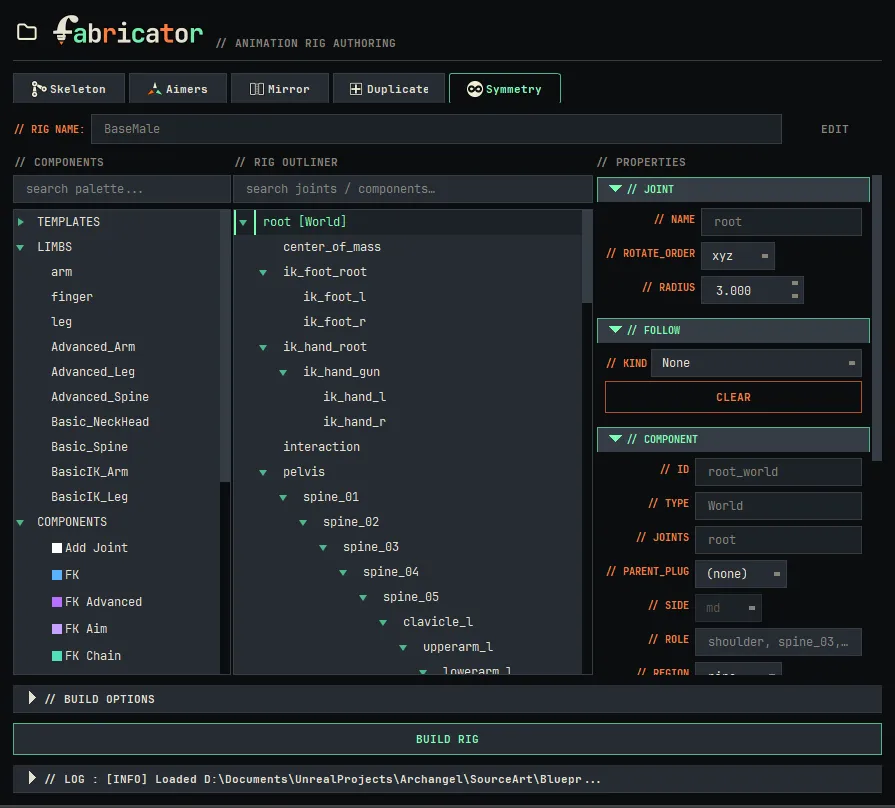
Components, outliner, and properties in one place
- 1
Launch Fabricator and choose File › New Rig to adopt the scene's skeleton.
- 2
Or choose a template from the Components section.
- 3
Have your own skeleton? Name the rig: that attaches a World component and you start building.
- 4
Starting fresh? Naming the rig creates a root joint with a World module. Build anything from there.
- 5
Click BUILD RIG