Drag one file into Maya and you are set up. The installer copies the toolset (or points at a shared one), wires it into Maya startup, and builds the toolbar immediately. No admin rights, no account, no network calls.

What it does
One file turns the download into a working setup
Fabricator_Install.py is the drag and drop entry point that turns the downloaded folder into a working FabricatorStudio setup. It copies the toolset (or points at it where it already sits), appends a sentinel guarded bootstrap block to your userSetup.py so Maya loads the toolbar on every launch, and then builds everything immediately so you never have to restart. Fabricator_Uninstall.py, alongside it, is the exact inverse.
The installer is deliberately self contained. It runs before the toolset exists on Maya's path, so it carries its own copy of the Mindmeld look rather than importing from a payload that is not there yet.
The window
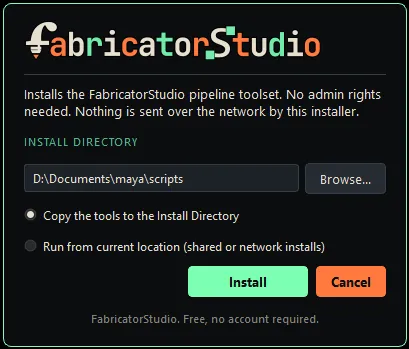
One card: directory, mode, install
- 01
Install Directory
Prefilled with your own Maya scripts folder, right for almost everyone. Browse to change it.
- 02
Install mode
Copy the tools (default, solo) or run from current location (shared or network).
- 03
Install
Runs the copy, the startup wiring, and the toolbar build. Nothing is written until you press it.
Copy the tools
The payload is copied into one folder, <Install Directory>/fabricator_studio/, holding maya_tools and icons side by side. That sibling layout is load bearing: the shelf builder finds its icons by walking up from its own file, so icons anywhere else silently blanks every icon.
Run from current location
Nothing is copied. Your Maya is pointed at the payload where it already lives, on a network drive or in a Perforce workspace. The TA unzips once into the share, every artist drags the same installer and picks this mode, and updates then happen centrally with no rewiring on anyone's machine.
In both modes the bootstrap block is written to your own Maya scripts folder. Where the payload lives is a separate question from how this machine finds it.
- 1
Unzip the download and open Maya (2022 or newer).
- 2
Drag
Fabricator_Install.pyfrom that folder into the Maya viewport. - 3
Check the Install Directory. It is prefilled with your own Maya scripts folder, the right answer for almost everyone.
- 4
Press Install. A progress card runs the copy, the startup wiring, and the toolbar build.
- 5
The welcome card appears: take the short tour, or skip it. The toolbar is already on screen.
Keep the unzipped folder somewhere findable. Fabricator_Uninstall.py lives in it, and re-dragging the installer later is how you update.
Nothing is written until you press Install
Dropping the file calls Maya's native drop hook, which opens a confirm card and stops there. Cancel or Esc closes it having touched nothing.
Your userSetup.py is preserved byte for byte
The bootstrap sits between FABRICATOR_START and FABRICATOR_END markers. Everything outside is untouched, and re-running replaces only that block.
It asks Maya where Maya lives
The default Install Directory comes from Maya itself, not Windows environment variables. With Documents redirected to another drive, guessing would wire a path Maya never loads.
Updating is just re-running it
A newer download detects the previous install and prefills its path, so the update lands on top of itself instead of nesting a second copy.
Your project configs are never in the blast radius
They live outside the install tree, so neither an update nor an uninstall can destroy them.
The toolbar is the front door
A fresh install loads the toolbar and hotkeys and deliberately does not add a menu or shelves. Want either? Turn it on in Settings under Maya Integration.
No restart, and zero network calls
After wiring, the installer runs the same calls startup would have, so the toolbar appears immediately. AutoSkin fetches its inference backend later from inside the tool, so nothing large rides along here.
Uninstalling
Drag the uninstaller in the same way
It strips exactly the sentinel block from userSetup.py and removes the menu and shelves from the running session. What happens to the files depends on the mode the install recorded.
A copy install
Its whole fabricator_studio folder is removed, along with the sentinel block, the menu and shelves, and the toolbar prefs.
A linked (shared) install
Nothing is deleted. Only this machine's wiring is undone, because a shared payload is never one artist's to remove.
Uninstalling also clears the "you have seen the welcome tour" flag, so a reinstall replays the tour. Useful if you want to see it again, surprising if you did not expect it.